All projects

Personal initiative, at Axome

AI tooling and agents

I turned my Claude Code skills into a team of five specialized agents. They pick up tasks from a board (Multica), work independently on my machine and report back with before-and-after screenshots. Nothing gets committed or shipped without my sign-off.

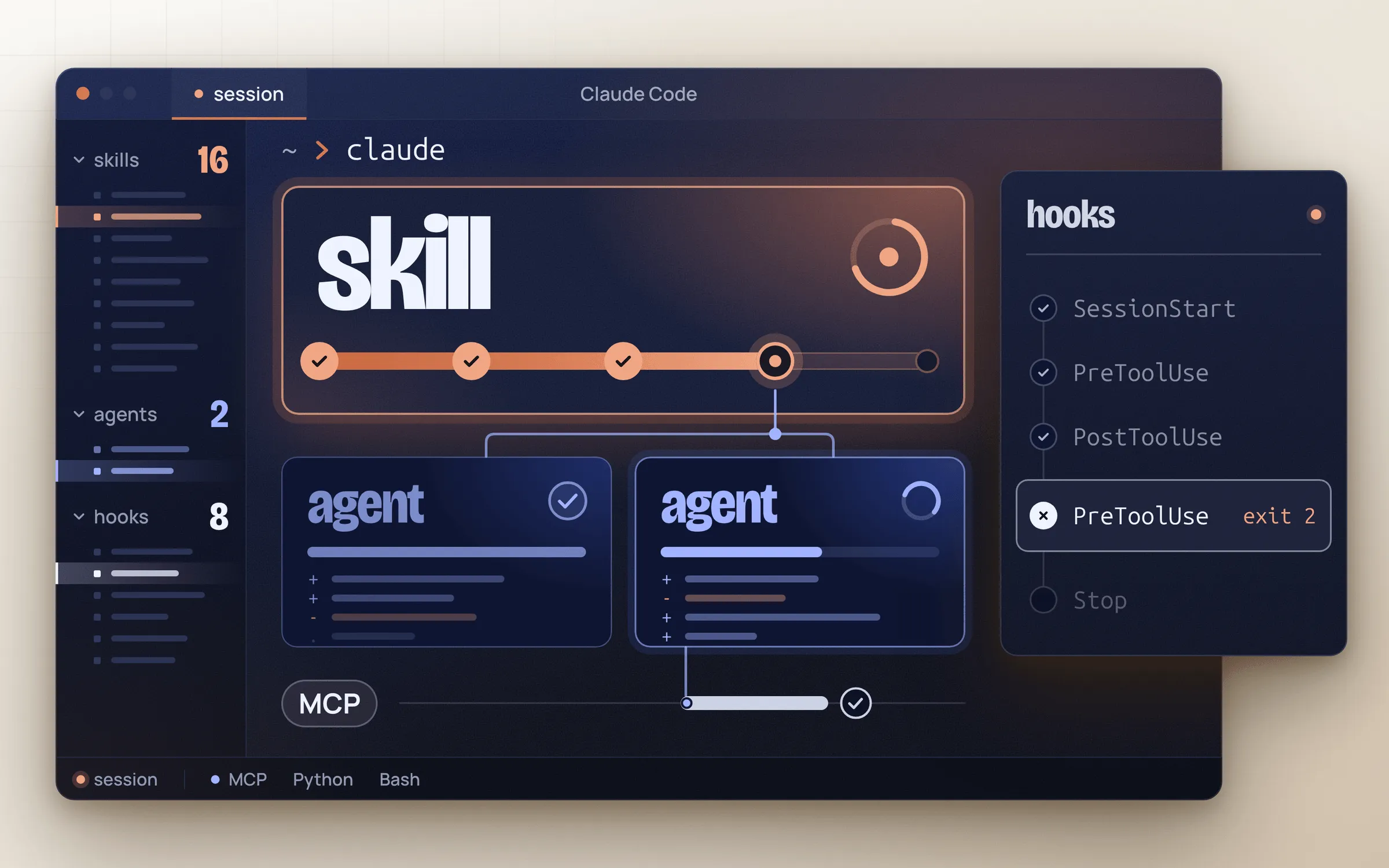
Illustration of a Claude Code session: a skill, two agents and hooks
5 specialized agents Coordinator, Dev, Integrator, Checkout and QA.
16 skills I wrote 7 of them built for the agents: 27 scripts, roughly 8,500 lines. Plus 2 subagents and 8 hooks.
170 guardrail tests For the hook that screens every command an agent runs.
3 shared skills 3 of the 11 skills in the agency's plugin are mine.
2 daily automations The morning prep, plus a follow-up after the team meeting.
Client
Personal initiative
Agency
Axome (European Digital Group)
My role
Shopify developer
Team
Just me and five AI agents. 3 of the 11 skills in the agency's plugin are mine.
Year
2026
Stack
Multica, Claude Code (skills, hooks, subagents, headless mode), Claude Opus, MCP (Figma desktop, Chrome DevTools, Shopify Dev), Shopify CLI, Admin GraphQL API (metafield and metaobject definitions), monday.com GraphQL API, iCalendar, Python, Bash, Node.js, Git worktrees

The brief

A typical week means maintaining several Shopify stores and building new sites from Figma, with the same steps over and over: read the ticket, create a branch, spin up a dev theme, take before-and-after screenshots, draft the reply, suggest the time to log. I wanted to hand that repetitive work to agents without losing control over what goes live.

The challenge

Real constraints: live stores, tickets billed by the hour, client tickets I can't edit and theme pushes that can wipe out everything. Every guardrail had to be enforced in code, not left to a prompt: a hook screens every command the agents run, backed by nearly 170 tests. Releases stay in my hands.

What the agents do for me

Here's what they do, not how they do it. The details stay under wraps here :)

  1. Ticket

    A task lands on the board.

    Multica as mission control

    Multica is a task board where AI agents are members of the team. For each task, a local service runs Claude Code in headless mode on my machine, so the agents work with my repositories, my skills and my guardrails. I run everything from the app: I review, correct and approve. I built the whole setup between October 14 and 25, 2026.

    • The morning prep. Every weekday morning, the Coordinator reads my tickets for the day and the work blocks on my calendar. It sets up one task per ticket, with a first analysis and an estimate, then sends me a recap before the team meeting. Nothing starts on its own: I decide which tasks to launch.

  2. The agent gets to work

    It picks up the task and works independently on its own branch.

    Five specialized agents

    AgentRole
    CoordinatorPlans my day, turns client feedback into tasks and hands work off to the other agents
    DevTheme bug-fix tickets, several at once
    IntegratorBuilds sections from Figma designs, several at once
    CheckoutCheckout extensions, Shopify Functions and apps, one task at a time
    QAWorks through QA feedback lists in batches
    • The ticket cycle. A minimal, measured fix, a report with before-and-after screenshots, then a check that what's live matches what I approved.
    • Launching a new site. The agent maps out every section in the Figma file, decides how to model the dynamic content and sets up the dev store. When it's unsure, it flags the question instead of guessing.
    • Working in parallel. Several agents can build and capture at the same time, each on its own dev theme, without stepping on each other.
  3. Report with screenshots

    It sends me a short report: a summary, before-and-after screenshots and the open questions.

    Seven skills built for the agents

    27 scripts, roughly 8,500 lines.

    SkillWhat it does
    Ticket cycleTakes a bug-fix ticket all the way, from the branch to the live check.
    Design integrationBuilds a section from Figma and checks the result against the design on desktop and mobile.
    QAWorks through a feedback list in one pass, with a suggested reply for each item.
    ScreenshotsShared building block: before-and-after screenshots and measurements for every fix.
    TicketsOpens client tickets in read-only mode (threads, attachments, images), lists the day's tickets and drafts a suggested reply.
    Task creationTurns a conversation into tasks and breaks an entire site down from its Figma file.
    Daily prepBuilds the morning prep from my tickets and my calendar.
    • Batch QA. A whole feedback list in one pass, with screenshots and a suggested reply for each item.
    • My other skills. Client documentation and data model handoffs, shared with the agency; estimates and tracked session time; a grid that assigns each agent a model and an effort level.
    • Plus a few others I'm keeping secret ;)
  4. My sign-off

    I review it, ask for changes or approve it.

    The guardrails

    • A hook screens every command the agents run, backed by nearly 170 automated tests.
    • Client tickets are read-only: the agent drafts, I do the updating.
    • No free-for-all pushes: an agent can only push its own task's branch.
  5. Release

    Nothing goes live without my approval. No agent can approve on my behalf.

    • Admin API changes only happen on stores I've approved, with no deletions: an agent never steps outside the limits I set.
  6. Live check

    After each release, an automatic check confirms that the live theme matches what I approved.

Next steps

Automate even more of the repetitive work, always within the same guardrails.

Designed and written by me. A personal initiative, built at Axome between projects.